Showing posts with label Photo. Show all posts

19 May 2012

Photoshoot? The Bricks Did It.

It was just a normal day at our Org Tambayan when we saw how perfect the sun kissed us and we just instantly thought, "Hey, let's take some photos!" And there ya have it, your cam-whores in action again. LOL.

** These photos were taken last semester **

Me, with Aimee of  Summer Star
Me, with Aimee of  Summer Star


Me, with Aimee of  Summer Star

After a few basic pa-cute shots, I noticed the brick wall across us and so I tugged Aimee along and made her my instant model for my photoshoot-photoshootan. LOL. We were unprepared but the camera really loved her. I wasn't even instructing her what to do. She just stood there and did her thing. Really love you, Aimee! :) Trivia: I was just using my phone's camera. 


LOL, we didn't even know what we're doing. Look, our expressions didn't even match. :)))
btw, this shot was taken by Momo of Charmed

RANDOOOOM~
this shot was taken by Momo of Charmed
  
Momo of Charmed posing with Aimee of  Summer Star   

Momo of Charmed posing with Aimee of  Summer Star   

Few more photos with our friends:

With Kuya Vem

With Albertti


I miss these guys already. We'll surely make more cam-whoring fun when school resumes. Awwyeah!


26 February 2012

Android App Review: Pixlr-o-matic

Follow my blog with Bloglovin


DESCRIPTION (from Android Market)
Add retro effects to your photos in a snap!
Awarded 2011’s "Best App Ever" award for the Best Photo Editing App on Android by 148apps.com

You can add fun retro effects to your photos in a snap and transform your photos into cool looking vintage images. Editing is as easy as one, two, three with Pixlr-o-matic to add effects, overlays and borders. So many options to choose from, there are more than 2,000,000 possible finishes to make your photos look spectacular!

MY THOUGHTS
I've already been using Pixlr-o-matic even before I had an android. I'm a great fan of vintage and retro-themed stuff since who-knows-when, so I was really thrilled when I found out about Pixlr-o-matic. When I got an android phone last September 2011, I was even more thrilled to see that Pixlr-o-matic has an android version, too! Now I can edit my photos anytime, anywhere, instantly! Here are some screencaps I took:

PHOTO EFFECTS
There are a number of presets available, most of them are grungy, vintage, and retro. Aside from these, you can also download additional effects if you like. However, I think the presets initially available are already adequate ;)

for this one, I chose "Anne"

OVERLAYS
The second step is to add overlays such as bocea, fog effect, glitters, chemical burn effect, stars, and many others.
For this one, I chose glitter.

FRAMES/BORDERS
Third and last step is to add a frame. Choose from basic borders to grungy, dirt, Polaroid, and a lot more.


SAVE
Easy as that, save your photo in the size you like.


I don't usually use the second and last step. I'm just really after the vintage filters and effects. It's pretty much enough already. However, you cannot adjust the tones, hues, and brightness of your photo here. So usually I still use PhotoWonder prior to using this one.

I give this app four stars 
just because I love the vintage filters :P

★ ★ ★ ★


Btw, this is 
ABSOLUTELY FREE
on the Android Market!


25 February 2012

Android App Review: PhotoWonder


DESCRIPTION (from the Android Market)
Show your perfect image with PhotoWonder ANYWHERE ANYTIME!
PhotoWonder is a fun app to edit pics on mobile.

          • Make cool collage pictures
          • Amazing effects like LOMO, BlueTone and Ageing
          • Lovely stickers and frames
          • Enlarge eyes and smooth skin easily
          • Share photos with the world
          • See editted pics by Review button


MY THOUGHTS
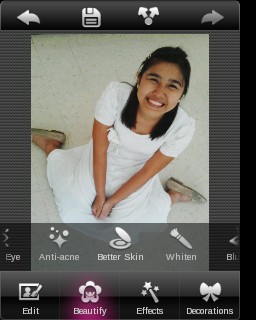
PhotoWonder is one of  the first photo-editing apps I've downloaded on my android phone (Samsung Galaxy Mini). Most of the first apps I tried, I deleted already because I wasn't satisfied. PhotoWonder is one of the very few photo apps that stayed in my phone up until now. I love how it practically has everything I want for my basic photo-editing needs. In this review, I'll show you all the basic editing you could do with PhotoWonder in a step-by-step photo set.

EDIT
 Here, you can apply vignette effect, rotate, crop, adjust brightness,
adjust contrast, and sharpen your image.

Notice the difference?
Here, I already tweaked the Brightness and Contrast of my photo.

 BEAUTIFY
In this option, you could do basic touch-ups such us Slimming, Larger Eye Effect, Anti-acne, Better Skin Effect, Fixing Red-eye, Whitening, and even Applying some Blush.


PHOTO EFFECTS
In this option, you can add more life and style to your photo by choosing from various photo effects such as Autumn, Blue Tone, Lomo, Time-Travel, Ocean, and a lot MORE. 

For this photo, I chose the Sweet Effect.


DECORATIONS
Here, you can add clip-arts and other cute icons on your photo.
Choose from hairbands, eyeglasses, fake mustaches, pre-set texts, balloons, lace frames, and a lot more.

I chose that cute bow-hairband under "Decorations"
I got that cute pair of wings under "Pranks"
They only have pre-set texts such as that cute "Smile" word art above.
It could have been better though if they could allow custom text.
Cute Lace Frame :">

EDITED PHOTO


COLLAGE
You can also make collages by clicking on the COLLAGE option in the Main Page.

Choose a Layout.
Then choose a background.
EDITED COLLAGE


Here are some of the photos and collages I created in PhotoWonder:


I HIGHLY RECOMMEND THIS APP.
Five stars for this.
★ ★ ★ ★ 


Btw, this is 
ABSOLUTELY FREE
on the Android Market!


♥ Blog Roll